AR / Spatial Computing · AI / Machine Learning · iOS / SwiftUI

Propel
LiDAR navigation for blind and low-vision people: haptic and sound alerts as obstacles get closer, plus spoken product labels.
- Platforms
- iPad, iPhone
- Category
- AR / Spatial Computing, AI / Machine Learning, iOS / SwiftUI
- Year
- 2026
- Built with
- Swift, SwiftUI, LiDAR depth sensing, Vision text recognition, Haptics & audio feedback
01Overview
Propel helps blind and low-vision people move through space and shop independently. It uses the LiDAR scanner to measure the distance to whatever is ahead and turns it into haptic and sound feedback that grows stronger as an obstacle gets closer. In a supermarket, it reads product labels aloud, including the product name and size.
02Interface
Tap any screen to view it full size.
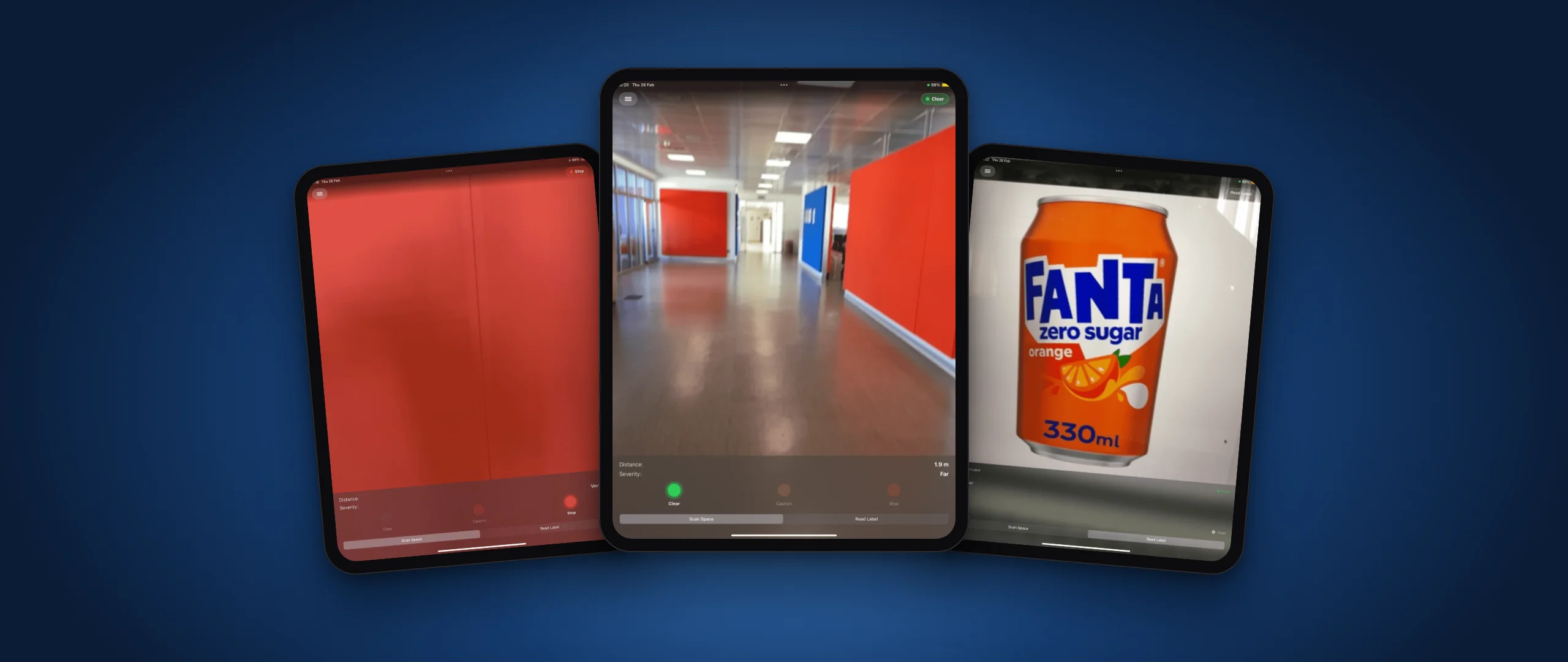
Scan Space: path clear, 1.9 m
Obstacle 0.4 m away: Stop
Read Label: product name and size spoken aloud
03Case study
01
The problem
Getting around an unfamiliar space and identifying products on a shelf are everyday tasks that still depend heavily on sighted help. Propel was designed with the Italian blind community CIVES, building on their real experience of these situations.
02
My role & contributions
Developer on the team. I wrote the code for both modes: LiDAR distance sensing with haptic and sound feedback, and the camera label reader.
03
Design & development process
Developed together with members of CIVES, whose feedback shaped how distance is communicated and how the two modes work. Created for the Swift Student Challenge 2025/26.
04
Solutions & features
- Scan Space: LiDAR depth sensing measures the distance to the nearest obstacle in real time.
- Three clear states (Clear, Caution, Stop) shown with colour and severity, from Far to Very Close.
- Haptic and sound feedback that intensifies as an object gets nearer, so it works without looking at the screen.
- Read Label: point the camera at a product to hear its name and size, for example the millilitres on a can.
04Technology
- Swift
- SwiftUI
- LiDAR depth sensing
- Vision text recognition
- Haptics & audio feedback